Hugo Theme Changes
The text on this site was too light (#999999) so I thought I would change to something darker: #555555 is used in a few other places so let’s choose that.
This was easier than I thought!
Right click > Inspect brings up the developer window in a browser. The window shows the html for the page, plus any styles applied.
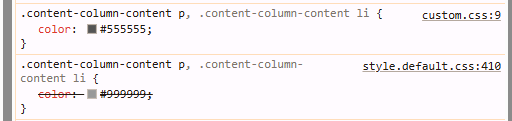
This also shows the file and line where the style comes from.
My guess was that adding the style for .content-column-content p to default.css would override style.default.css because of hierarchy of styles. Don’t ask me exactly where this is defined, my assumption is that it’s just part of the cascading style sheets system.
These are the new lines for the body text for posts and for the sidebar text.
.content-column-content p,
.content-column-content li {
  color: #555555;
}
.sidebar-p {
  color: #555555;
  font-size: 14px;
}
That’s it! Something that’s been bothering me for ages, fixed in a few minutes, with a bonus blog post written too.
Additional changes: open links in new window by default.
https://hongtaoh.com/en/2020/06/20/new-tab-in-hugo/
https://digitaldrummerj.me/hugo-links-to-other-pages/
https://discourse.gohugo.io/t/making-external-links-open-in-a-new-tab-by-using-the-replacere-function-to-change-the-output-of-content/51913/2
https://discourse.gohugo.io/t/how-to-open-plain-url-links-in-a-new-tab/25523/5